Cloud ECR
We recommend that you use local communication protocols such as LAN or RS232 to connect to Wonder Terminals. This connection method is usually more stable and faster than an internet connection. However, we understand that in certain scenarios (e.g., when Wonder Terminals cannot be placed on the same network as your POS devices due to specific reasons), an internet connection may be the only option. Therefore, we have also prepared a connection solution based on internet technologies.
Since the ECR itself already has a complete data encryption process, the Cloud ECR API does not require signature verification with an appid, unlike other Open APIs. This is to maintain consistency with the LAN/RS232 mode, so there is no need to refer to the authentication documentation.
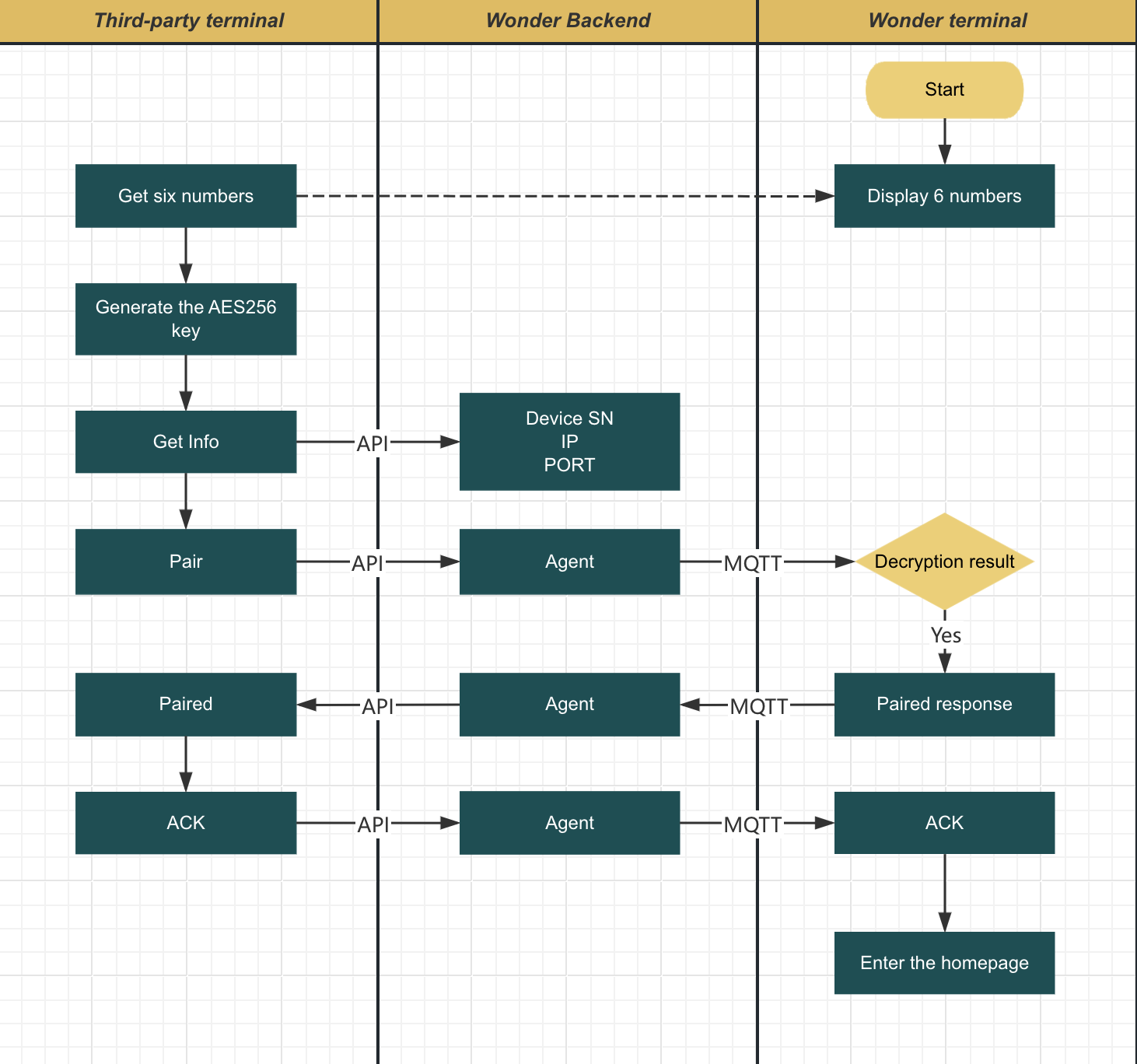
Workflow
- Get the 6 digits numbers from wonder terminal paring page.
- Get terminal basic information via Get Device Info API.
- Send command to terminal via Send Command to terminal API, follow ECR body protocols
- Use the 6 digits number to encrypt the
Get Device Info APIandPaircommand. - The
Paircommand will be return a new pin code, use the new pin code to encrypt other commands.
Environments
Please check Environments learn how to connect Sandbox or Production.
Data Format
Request body
| Variable | Type | Required | Description |
|---|---|---|---|
| version | String | Y | Current communication protocol version number |
| action | enum | Y | Actions: Pair, DeviceInfo, Sale, ... |
| data | String | Y | Encrypted data, It is necessary to distinguish the encryption keys of this data: pinCode1 and pinCode2 |
Response body
| Variable | Type | Required | Description |
|---|---|---|---|
| code | Number | Y | Current communication protocol version number |
| message | String | Y | Actions: Pair, DeviceInfo, Sale, ... |
| data | Object | Y | This data object is an ECR response data structure |
| data.version | String | Y | Please refer to the version description of the ECR response data structure |
| data.action | enum | Y | Please refer to the action description of the ECR response data structure |
| data.data | String | Y | Please refer to the data description of the ECR response data structure |
Get Device info API
Retrieves the basic information of the device for subsequent operations.
- Device SN: Each command API request should include the device SN for backend identifier decide send command to which terminal.
- Local LAN Server Information: The terminal local network ECR API endpoint if it's connected a LAN network.
Request Body Header
| Header Name | Comment |
|---|---|
| X-P-Business-ID | the business id |
| X-Request-ID | A unique UUIDv4 for track api call |
Reqeust Body Format - Before encryption
| Field Name | Comment |
|---|---|
| pairUuid | A randomly UUIDV4 |
{
  "header": {
    "requestID": "9c07d8d7-2a43-4a29-9c6d-6b8d8f7d44e5",
    "timestamp": "2025-11-12T10:12:04+00:00"
  },
  "body": {
    "pairUuid": "3f37e6c0-bf6e-4c00-b1fa-b2bd5e1d6a3b"
  }
}
Response - After decryption
| Field Name | Comment |
|---|---|
| ip | The terminal local server IP Address |
| port | The terminal local server listen port |
| deviceSn | The terminal device SN |
{
  "header": {
    "responseID": "2c7f32e1-b9e4-4b34-96cc-15c51289f69b",
    "clientDeviceSN": "NEXGO-N96-1170270945",
    "timestamp": "2025-11-12T10:12:04+00:00"
  },
  "body": {
    "ip": "127.0.0.1",
    "port": "4499",
    "deviceSn": "NEXGO-N96-1170270945"
  }
}
Use http://${ip}:${port}/v2/wonder/payment/ecr connect to Local ECR Server.
Send command to terminal API
Used to send commands to the terminal for execution. Check ECR interfaces get all command details.
Note: Void/Refund commands will not be forwarded to the terminal and will be processed directly in the cloud. Therefore, Void/Refund operations do not depend on whether the device is powered on or the network is online.
Start building
Please refer to our Source Codes - Cloud ECR examples get more details.